

Product-specific Commissions
Earn commissions by promoting products from www.FashionBill.com—this is a form of affiliate marketing, widely recognized as a highly effective distribution strategy.
After research, the FashionBill team found that promoting specific products directly yields far better results than promoting an entire store. Why? Targeting audiences based on individual products is more precise, leading to a significantly higher conversion rate for product-specific affiliate marketing compared to full-store promotion. That’s why we recommend focusing on product-specific promotion in your daily efforts—it’ll help you earn more commissions!
All products on FashionBill are carefully curated, high-quality items that are top-sellers loved by customers. You can promote these products by posting content or videos on social media.
1. About Your Affiliate Tracking ID
(1) What is an Affiliate Tracking ID?
As we mentioned earlier, Affiliate Programs use Referral Links and Coupon Codes to track and attribute converted orders to individual affiliates. This is because Referral Links contain a unique string called your Affiliate Tracking ID—every affiliate has their own exclusive ID. Affiliate Programs rely on this ID to determine which affiliate should receive credit for a successful order. 
Therefore, when promoting products, the links you share must include your Affiliate Tracking ID. Only then can the system accurately track your converted orders and calculate your commissions. If you share links without your Affiliate Tracking ID, the system won’t be able to process your commissions—and that will hurt your earnings!
(2) How to Get Your Affiliate Tracking ID
1. In the Affiliate Program, copy your "Referral Link" (see image below). 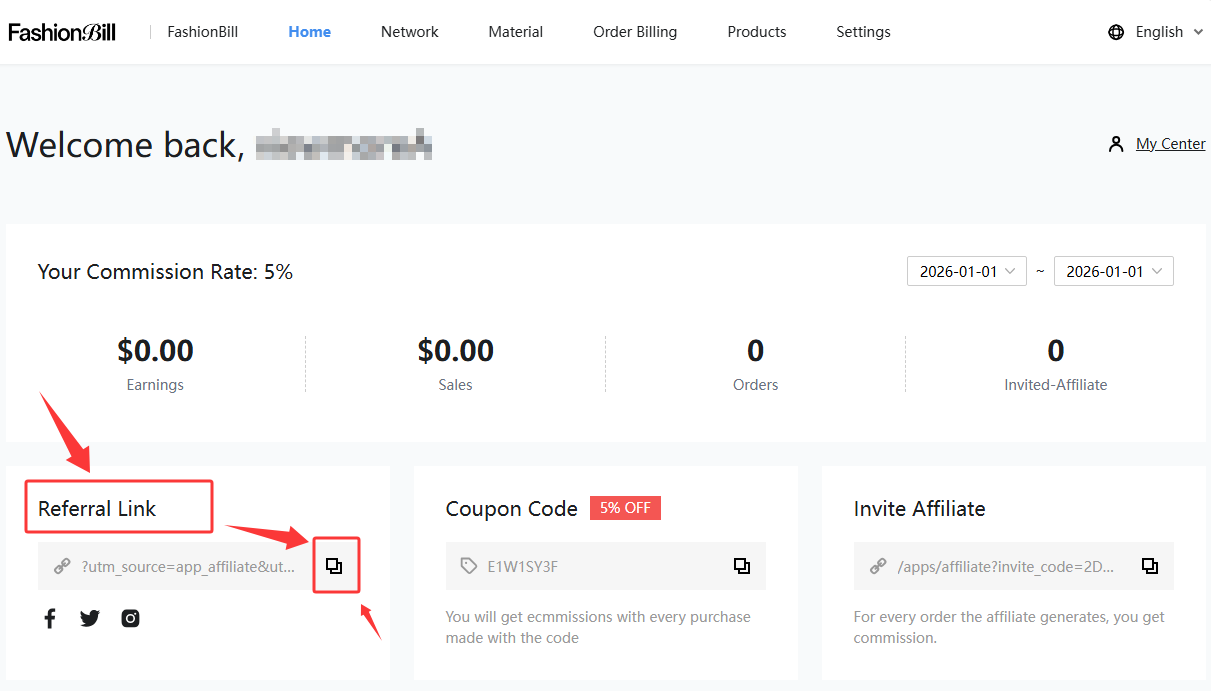
2. Create a new text document and paste the copied "Referral Link" into it.
3. In the document, delete the prefix "https://www.fashionbill.com" from the link. Important: Only remove "https://www.fashionbill.com"—leave everything else unchanged (see image below). 
4. The remaining string will follow this format: "?utm_source=app_affiliate&utm_medium=***************"—this is your Affiliate Tracking ID (see image below). 
5. Save this ID—you’ll use it repeatedly in future promotions.
2. Choosing Products to Promote
(1) Selecting Products from the Affiliate Program
FashionBill features select products as key promotions in the Affiliate Program during specific periods. These products offer a higher commission rate than others.
You can find these products in the "Favorite List" section or "Products" tab on the Affiliate Program’s "Home" page. Choose the products you want to promote, click "SHARE LINK" to get your promotional link, and start promoting!
The link generated by clicking "SHARE LINK" already includes your Affiliate Tracking ID, so you can share it directly. The system will automatically calculate your commission once an order is successfully converted.
(2) Selecting Products from www.FashionBill.com
If you want to promote more products beyond the featured selections, visit www.FashionBill.com:
• Click the "Group" tab to browse product collections, or
• Select products directly from the "Product" tab.
Once you’ve chosen a product, click to open its details page and copy the link from your browser.
But wait—there’s a crucial catch! The link you copy this way will not include your Affiliate Tracking ID. If you share this link as-is, you won’t earn any commissions for successful orders!
Don’t worry—we’ll show you how to fix this next.
3. Adding Your Affiliate Tracking ID to Product Links
Now that you have your Affiliate Tracking ID saved, it’s time to put it to use! Here’s how to add it to any product link:
1. Open your text document and paste your Affiliate Tracking ID into it (see image below). 
2. Visit www.FashionBill.com, select the product you want to promote, and copy its link (see image below). 
3. Paste the product link before your Affiliate Tracking ID to create a new promotional link.
4. The final link will follow this format:"Product Link" + "?utm_source=app_affiliate&utm_medium=********" (see image below). 
When promoting products, always share this updated link (with your Affiliate Tracking ID included). This guarantees you’ll earn a commission for every successfully converted order.
(1) Video Platforms (TikTok/YouTube)
Post product videos from a buyer’s perspective—showcase the product’s uniqueness and practicality. Include your promotional link in the comments section.
(2) Other Social Media Platforms
Promote on platforms like Facebook, Pinterest, Instagram, or X. Always include your promotional link when posting content.
(3) Engage with Niche Influencers
Comment on posts from niche influencers or reply to other users’ comments. For example, if you’re promoting products from the "Pet Parent" collection, follow pet-related accounts and interact with their content or commenters.
Share your link in communities like WhatsApp groups to reach targeted audiences.
(5) Build Niche Social Media Accounts (Recommended for Extra Earnings)
If you have enough time, create multiple niche accounts (e.g., parenting, pet care, fitness) across social media. Post professional, valuable content to attract targeted followers. Once your accounts have a solid follower base, start sharing relevant FashionBill products.
This strategy helps you connect with audiences who are already interested in your niche—boosting your conversion rates and commissions!
← Back to Contents